Back
Export color palette to SCSS/LESS/CSS variables file
Every palette on ColorsWall can be downloaded as a file or as ready-made variables, so the same colors end up in your design tool and in your code.
how to export color palette to SCSS/LESS/CSS variables file?
- Find your palette or create new one
- Open Link with palette (For example: Bootstrap 4 Colors )
Any palette page works, whether it's one of yours or someone else's.
- Press «Export» button
The «Files» tab downloads the palette as ASE (Adobe Swatch Exchange, for Photoshop and Illustrator), SVG or JSON. The CSS, SCSS and LESS tabs show the colors as variables, and the «Colors» tab gives a plain list of HEX codes as a .txt file.
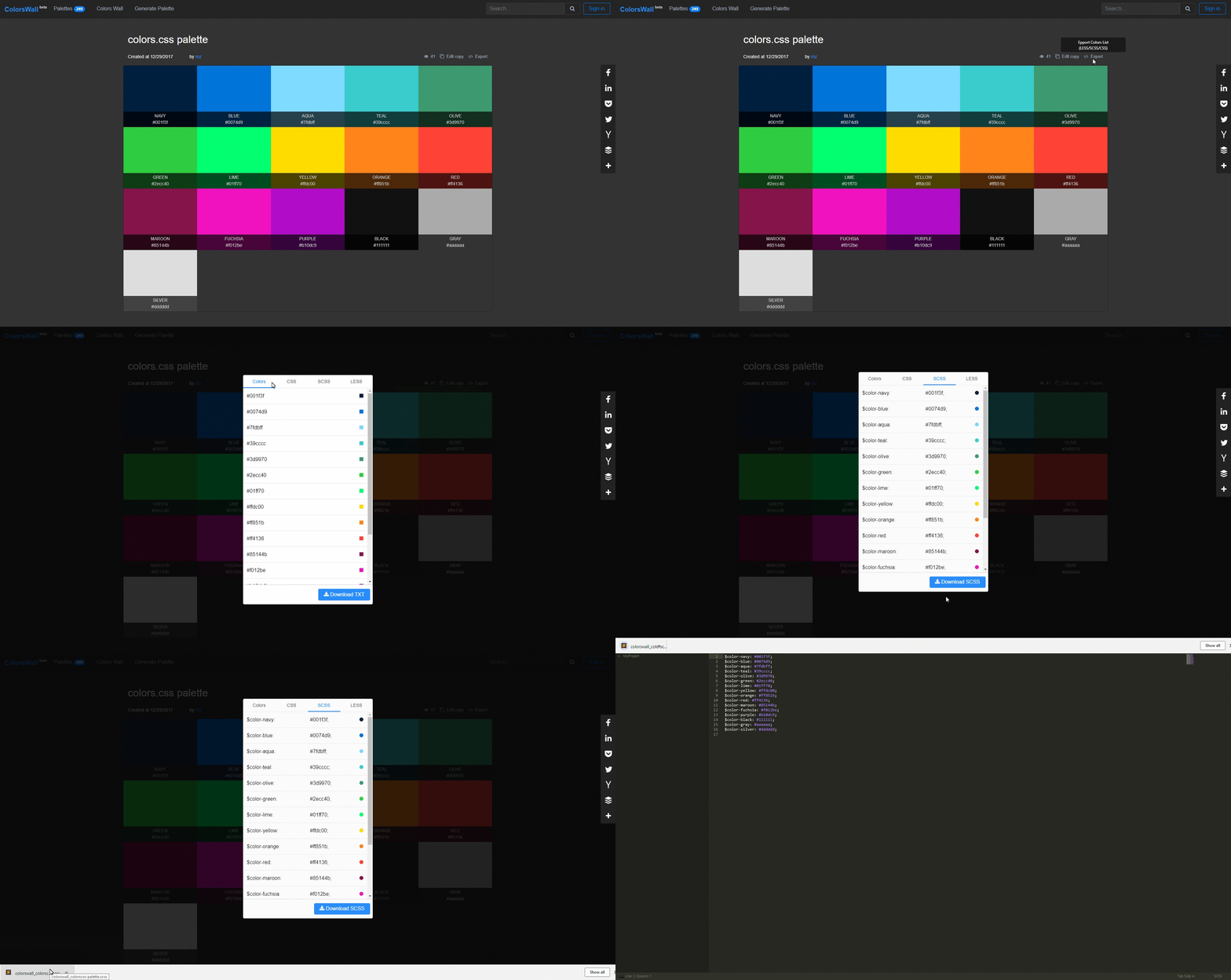
- Choose file type SCSS, LESS or CSS and press «Download» button
Variables take their names from the color names in the palette, for example --color-sky-blue, or are numbered --color-1, --color-2 when a color has no name. The CSS file wraps them in :root, so it works as-is.
- Save file and enjoy.
Export color palette to SCSS/LESS/CSS variables file video tutorial
Prefer to watch? The video below walks through exporting a palette.